

National Insurance Company Limited (NICL), India’s oldest and leading public-sector general insurance company, has invited online applications for recruitment of Assistants in Class III Cadre from the open market. The Apply link is available at the bottom of the page.
| Start Date | 18th July 2026 |
| Last Date | 07th August 2026 |
| Post Name | Assistants |
| Vacancy | 500 |
| Eligibility | Bachelor’s Degree |
| Age | 21 to 30 years |
| Fee | ₹850/- (for gen cat) |
| Prelim Exam | 27th August 2026 |
| Main Exam | 30th October 2026 |
| Website | nationalinsurance.nic.co.in |
| Apply Click | |
| Quick Links Click | |
Notification Date: 18.07.2026
NICL Assistant Recruitment 2026: Important Dates
Eligible Candidates can apply online for recruitment to 500 Vacancies for the post of Assistant in the National Insurance Company Limited (NICL). The online application started on 18th July 2026 on the Official website of National Insurance Company Limited (NICL). The last date for the application, as per the notification of NICL – 2026, is 07th August 2026.
• The online application forms can be downloaded up to 07th August 2026.
● Vacancies are tentative and may increase/ decrease with any notice. Any change in the number of vacancies will be intimated through NICL recruitment.
NICL Assistant Recruitment 2026: Vacancy Breakup
State/ Union Territory Wise Vacancies
| SI. No | State/UT | Vacancies |
| 01. | Andhra Pradesh | 14 |
| 02. | Arunachal Pradesh | 05 |
| 03. | Assam | 18 |
| 04. | Bihar | 12 |
| 05. | Chhattisgarh | 18 |
| 06. | Goa | 02 |
| 07. | Gujarat | 34 |
| 08. | Haryana | 03 |
| 09. | Himachal Pradesh | 02 |
| 10. | Jharkhand | 10 |
| 11. | Karnataka | 30 |
| 12. | Kerala | 35 |
| 13. | Madhya Pradesh | 18 |
| 14. | Maharashtra | 57 |
| 15. | Pondicherry (UT) | 02 |
| 16. | Meghalaya | 02 |
| 17. | Mizoram | 02 |
| 18. | Nagaland | 01 |
| 19. | Orissa | 16 |
| 20. | Punjab | 10 |
| 21. | Rajasthan | 36 |
| 22. | Sikkim | 01 |
| 23. | Tamil Nadu | 49 |
| 24. | Telangana | 15 |
| 25. | Tripura | 02 |
| 26. | Uttar Pradesh | 24 |
| 27. | Uttarakhand | 08 |
| 28. | West Bengal | 46 |
| 29. | Chandigarh (UT) | 04 |
| 30. | Delhi (UT) | 20 |
| 31. | Jammu & Kashmir | 04 |
| 32. | Total | 500 |
NICL Assistant Recruitment 2026: Educational Qualification
● Candidates must have a Bachelor’s degree from any recognized University/ Institute.
● Knowledge of Reading, writing, and speaking of the regional language of the state/ UT. Candidates familiar with the regional language.
Notes: Candidates are requested to satisfy themselves before they apply that they fulfill the requirement as to Age, educational qualification, and criteria, and if found ineligible, their candidature will be canceled at any stage of recruitment.
NICL Assistants Recruitment 2026 Age Limit: (as on 01.07.2026)
| Category | Min. Age | Max. Age |
| General | 21 years | 30 years |
| OBC | 21 years | 33 years |
| SC/ST | 21 years | 35 years |
| PwBD | 21 years | 40 years |
● The NICL Assistants Recruitment 2026 guidelines for age relaxation.
NICL Assistant recruitment 2026: Application Fee
The applicant pays the application fee online only using a debit card/ credit card / Net banking.’ FEE ONCE PAID SHALL NOT BE REFUNDED’
| Category | Application Fees |
| General/OBC/EWS | ₹ 850/- |
| SC/ST/PwBD | NIL |
| Ex-servicemen |
Quick Links
Photo & Sign
| Documents Name | Documents Size | Format |
| Photo (color) | 20kb to 50kb | JPG/JPEG Only |
| Signature (Black Ink Pen) | 10kb to 20kb | |
| Left Thumb | 20kb to 50kb | |
| Declaration (English) | 50kb to 100kb |
How to Apply NICL Assistant Recruitment 2026.
01 Step: Visit the Official Website of the National Insurance Company Limited (NICL). Using the link https://nationalinsurance.nic.co.in/
02 Step: Click on the ‘Recruitment‘ option available on the right side of the page.


03 Step: Then Click on the link ‘RECRUITMENT OF 500 ASSISTANTS (CLASS-III)’ Tab available at the middle of the page.


04 Step: Next Select the link “Click here to Apply online” It will lead to a new website.


05 Step: If you have not registered before click on ‘Click here for New Registration’ If you have registered yourself before then enter your registered Number and password and click on ‘Login’.
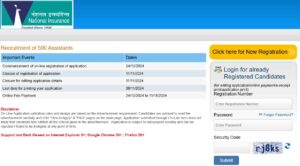

06 Step: After filling the form properly click on the “Submit ” button. A login ID and Password will be generated and will be sent to the registered E-Mail ID and mobile number. please note down the Login ID and Password for future reference.
07 Step: Then to upload a photo & sign, candidates must log in by using their Login ID and Password. Check the size of the image & sign.
08 Step: Next, make the payment using available options. Check the application fee.
09 Step: Please preview the application form and check all the information you have filled/ entered before final submit as after submitting the form in this step, the candidate will not be able to edit/modify the application form.
10 Step: After successful submission of the form, the user is advised to download & take the printout of the Online Application Form using the print form option for future reference using print form option.


