


The State Bank of India invites online applications for Specialist Cadre Officer (SCO) posts on a Contract Basis, under the Ministry of Finance. The Apply link is available at the bottom of the page.
| Advt. No | CRPD/SCO/2025-26/17 |
| Start Date | 02 December 2025 |
| Last Date | 23 December 2025 |
| Post Name | Wealth Management |
| Vacancy | 996 |
| Eligibility | Graduates |
| Age | 20 to 42 years |
| Fee | ₹ 750/- (for gen cat) |
| Website | https://sbi.bank.in |
| Apply Click | |
| Quick Links Click | |
SBI SCO Vacancy 2025 Important Dates
Eligible applicants can apply online for the recruitment of 996 vacancies for the post of Specialist Cadre Officer on a Contract Basis as VP Wealth (SRM), AVP Wealth (RM), and Customer Relationship Executive in the State Bank of India. The online application started on 02nd December 2025 on the official website of the State Bank of India (SBI). The last date for application as per the SBI Notification-2025 is 23rd December 2025.
● The last date for making online fee payments is 23rd December 2025.
● Online application forms submitted only may be downloaded/ printed up to 23rd December 2025.
● Applicants are advised to apply before the last date, as the server may experience technical issues due to high traffic on the application deadline.
SBI SCO 2025: Posts/ Vacancies
| Name of Post | UR | OBC | EWS | SC | ST | Vacancies |
| VP Wealth (SRM) | 188 | 136 | 46 | 92 | 44 | 506 |
| AVP Wealth (RM) | 82 | 52 | 20 | 33 | 52 | 206 |
| Customer Relationship Executive | 115 | 73 | 28 | 47 | 73 | 284 |
| Total | 385 | 261 | 94 | 172 | 169 | 996 |
SBI SCO 2025 Educational Qualification /Experience
01. VP Wealth (SRM)
➣ Candidates must have a Bachelor’s degree from a recognised University/ Institute.
➣ MBA (Banking/ Finance/ Marketing) with 60% marks from a recognised University/ Institute.
➣ A certificate such as NISM V-A, XXIA-A, CFP/ CFA.
02. AVP Wealth (RM)
➣ Graduated from a Government-recognised University or Institution.
➣ Post-Graduation in Finance/ Marketing/ Banking.
➣ A certificate such as NISM V-A, XXIA-A, CFP/ CFA.
03. Customer Relationship Executive
➣ Graduated from a Government-recognised University or Institution.
➣ Experience in documenting the requirements of financial products and good communication skills would be desirable.
➣ Candidates should have a valid driving licence for a two-wheeler.
SBI SCO Vacancy 2025 Age Limit: (as on: 01.05.2025)
| Name of Post | Min. Age | Max. Age |
| VP Wealth (SRM) | 26 years | 42 years |
| AVP Wealth (RM) | 23 years | 35 years |
| Customer Relationship Executive | 20 years | 35 years |
Age relaxation under the SBI Specialist Cadre Officers Recruitment 2025 guidelines.
SBI SCO Vacancy 2025 Application Fee / How to pay
The applicant pays the application fee online only using a debit card/ credit card/ Net banking. ‘FEE ONCE PAID SHALL NOT BE REFUNDED’
| Category | Fee |
| UR/OBC/EWS | ₹ 750/- |
| SC/ST/PwBD | Nil |
Quick Links
SBI SCO Vacancy 2025: Photo & Sign:
| Document Name | Document Size | Format |
| Photo (Colour) | 20kb to 50kb | JPG/JPEG only |
| Signature ( Black Ink Pen ) | 10kb to 20kb | JPG/JPEG only |
| Documents | Max. 500Kb | PDF only |
Selection Process of SBI SCO Vacancy 2025
The selection process will comprise shortlisting of the candidates, followed by one or more rounds of personal/ Telephonic/ Video interview and CTC negotiations.
How to Apply for SBI SCO Vacancy 2025
01st Step: Visit the Official website of the State Bank of India (SBI) using the link https://sbi.co.in/
02nd Step: Click on the SBI Join Tab and select the Current Openings option available at the top of the page. It will lead to a new website.


03rd Step: Select the link ‘Apply Online’. It will take you to a new page
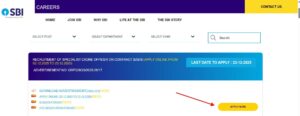

04th Step: If you have not registered before, click on ‘Click here for New Registration’, if you have registered yourself before then click on “Login”
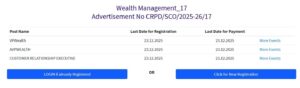

05th Step: After filling the form properly click on “Submit” button. Login ID and Password will be generated and will be send to the registered e-mail ID and mobile number. Please note down the Login ID and Password for future reference.
06th Step: To upload a photo & sign, candidates must login using their Login ID and Password. Check the size of the image & sign.
07th Step: Next, make the payment using the available options. Check the application fee.
08th Step: Please preview the application form and check all the information you have filled/entered before final submit as after submitting the form in this step, the candidate will not be able to edit/modify the application form.
09th Step: After successful submission of the form, the user is advised to download & take the printout of the Online Application Form using the print form option for future reference using print Form option.


