




The Supreme Court of India has invited applications for the post of Junior Court Attendant. Candidates can apply through the direct link available at the bottom of the page.
| Advt.No | F.3/2026 SC (RC) |
| Start Date | 04th November 2026 |
| Last Date | 25th November 2026 |
| Post Name | Junior Court Attendant |
| Vacancy | 130 |
| Eligibility | 10th Pass |
| Age | 18 years to 27 years |
| Fee | ₹1500/- (for gen cat) |
| Salary | ₹ 69,100/- per month |
| Website | www.sci.gov.in |
| Apply Click | |
| Quick Links Click | |
Notification: 15.10.2026
SCI JCA Exam 2026 Important Dates
Eligible applicants can apply online for 130 Vacancies for the post of Junior Court Attendant in the Supreme Court of India under the Ministry of Law and Justice, Govt. of India. The online application started on 04th November 2026 on the Supreme Court of India’s official website. The last date for application, as per the Supreme Court of India notification 2026, is 25th November 2026.
• The last date for making online fee payments is 25th November 2026.
• Online application forms submitted only may be downloaded/ printed up to 25th November 2026.
• The number of vacancies is tentative and subject to change, i.e., increase or decrease due to administrative reasons.
SCI JCA Exam 2026 Vacancy Breakup
| Post Name | Vacancies |
| Junior Court Attendant | 130 tentative |
SCI JCA Exam 2026 Educational Qualification
• Minimum 10th Standard examination conducted by any Board/ Institute recognized by the Government.
• Maximum 10+2 examination conducted by any Board/ Institute recognized by the Government.
SCI JCA Exam 2026 Age Limit: (as on: 01.10.2026)
| Post Name | Min. Age | Max. Age |
| Junior Court Attendant | 18 years | 27 years |
Age relaxation under the guidelines of the Supreme Court of India, Junior Court Attendant Exam 2026.
SCI JCA Exam 2026 Application Fee / How to pay
The applicant pays the application fee online only using a debit card/ credit card/ Net banking ‘FEE ONCE PAID SHALL NOT BE REFUNDED’
| Category | Fee |
| General/ OBC | ₹ 1500/- |
| SC/ST/PH/Ex-Servicemen | ₹ 750/- |
SCI JCA Exam 2026 Selection Process:
Stage 01: Written Test (MCQ)
Stage 02: Interview.
Stage 03: Document Verification.
Quick Links
Apply Now (Link turns on: 04.11.2026)
SCI JCA Scheme of Examination 2026:
| S.NO | Subject Name | Max. Marks | Min. Marks | Duration |
| 01. | General Intelligence & Reasoning | 25 | 25 | 90 Min. |
| 02. | Numerical Aptitude | 25 | 25 | |
| 03. | General English | 25 | 25 | |
| 04. | General Awareness | 25 | 25 | |
| Total | 100 | 100 | ||
Photo & Sign:
| Document Name | Document Size | Format |
| Photo (Colour) | 100kb to 200kb | JPG/JPEG only |
| Signature ( Black Ink Pen ) | 80kb to 150kb | |
| Documents | 100kb to 1000kb | JPG/JPEG/PDF only |
How to Apply for Supreme Court of India JCA Exam 2026:
01st Step: Visit the official website of the Supreme Court of Judicature of India. https://www.sci.gov.in/
02nd Step: Click on the “Notices” tab and click on the “Recruitment” option available at the top of the page. It will lead to a new website.
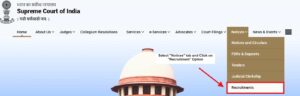
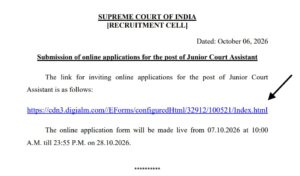
03rd Step: Select the link “Link to submit online application forms for the post of Junior Court Assistant.” It will take you to a new page.

04th Step: Then click on the Link
https://cdn3.digialm.com//EForms/configuredHtml/32912/100521/Index.html
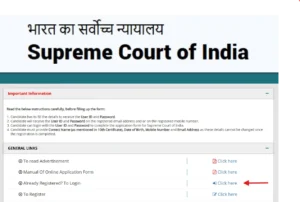
05th Step: if you have not registered before, click on ‘To Register’; if you have registered yourself, then click on ‘Login’
06th Step: After filling the form properly, click on the “Submit” button. Login ID and password will be generated and will be sent to the registered e-mail id and mobile number. Please note down the Login ID and password for future reference.
07th Step: To upload a photo & sign, candidates must login using their Login ID and password. Check the size of the photo and sign.
08th Step: Next, make the payment using the available options. Check the application fee.
09th Step: Please preview the application form and check all the information you have filled/entered before final submission as after submitting the form in this step, a candidate will not be able to edit/modify the application form.
10th Step: After submitting the application in Step 07, candidates are required to take a printout of the application form. Click on “Application printout/reprint”. Check the last date to print the application.

